
+- Little Fighter Empire - Forums (https://lf-empire.de/forum)
+-- Forum: Little Fighter 2 Zone (https://lf-empire.de/forum/forumdisplay.php?fid=7)
+--- Forum: LF2 Discussion (https://lf-empire.de/forum/forumdisplay.php?fid=8)
+--- Thread: LF2 v2.0a available on Linux and Mac (/showthread.php?tid=10086)
LF2 v2.0a available on Linux and Mac - MangaD - 09-30-2015
1. Install POL/POM
Linux users: https://www.playonlinux.com/en/download.html
Mac users: https://www.playonmac.com/en/download.html
2. Install LF2
Linux
Mac
RE: LF2 v2.0a available on Linux and Mac - Hellblazer - 10-01-2015
Earlier it wasn't available for them?
It used some third party configuration or what?
RE: LF2 v2.0a available on Linux and Mac - MangaD - 10-01-2015
(10-01-2015, 04:55 PM)Hellblazer Wrote: Earlier it wasn't available for them?
It used some third party configuration or what?
Unix-like operating systems (eg. Linux and Mac) do not run DOS-like operating systems' (eg. Microsoft Windows) executable files by default.
First let me introduce some concepts:
- Wine (recursive acronym for Wine Is Not an Emulator) is a free and open source compatibility layer software application that aims to allow applications designed for Microsoft Windows to run on Unix-like operating systems.
- winetricks is a helper script to download and install various redistributable runtime libraries needed to run some programs in Wine.
 ).
And because there are many more programs that are "difficult" to install with Wine+winetricks, due to their specific requisites, PlayOnLinux/Mac was born to ease the process. All users need to do to install a game with PlayOnLinux/Mac is search it on the list, if it exists (ie. if someone put it there), and install it normally (click next, next...). But of course, each program is different and has different dependencies, therefore the install process is different for each, and so contributors have to write scripts for POL/POM to install the software they want. If nobody contributes with a certain software, it simply won't be available. In this case I was the contributor.
.gif ";)")
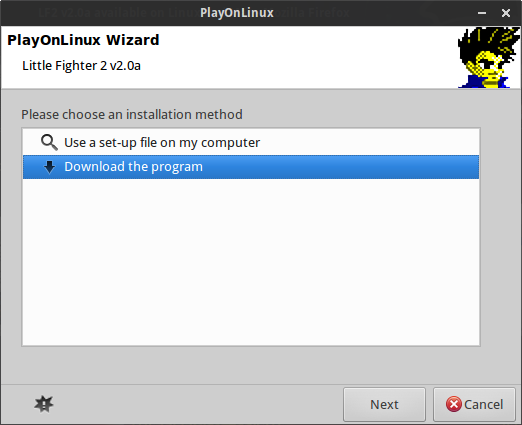
Here are some pics:



RE: LF2 v2.0a available on Linux and Mac - Archer-Dante - 10-02-2015
well it's still sad cuz not official release but tweak
RE: LF2 v2.0a available on Linux and Mac - Hellblazer - 10-02-2015
(10-01-2015, 06:52 PM)MangaD Wrote: If nobody contributes with a certain software, it simply won't be available. In this case I was the contributor.
Haha, great job then! But still, not everyone knows about this program though, for now..

ps-only the last screenshot was fairly visible
RE: LF2 v2.0a available on Linux and Mac - Memento - 01-09-2018
We tried to install LF2 in ubunto, using PlayOnLinux. The installation doesn't create a virtual drive so we couldn't install the game properly. I attached the log file.
Any idea what is going wrong?
File log:
Code:
PlayOnLinux debugging tool (v4.2.12)
-----------------------------------------------
Debugging: Little Fighter 2 v2.0a

Warning: This is a PlayOnLinux script logfile. It does not contain everything that happened in your program\'s virtual drive (wineprefix)
Please do not use this logfile on winehq forum, this logfile is not interesting for wine debugging.

Date: 01/09/18 21:21:36

> uname -a
  Linux erick 4.13.0-21-generic #24-Ubuntu SMP Mon Dec 18 17:29:16 UTC 2017 x86_64 x86_64 x86_64 GNU/Linux
> lsb_release -a

> wine --version (Be careful; this version might not be the version used
in the script. Read the content of this file for more information)
  wine-2.21 (Staging)
> glxinfo \| grep rendering
  direct rendering: Yes
> glxinfo \| grep renderer
      GLX_MESA_multithread_makecurrent, GLX_MESA_query_renderer,
    GLX_MESA_multithread_makecurrent, GLX_MESA_query_renderer,
Extended renderer info (GLX_MESA_query_renderer):
OpenGL renderer string: AMD CEDAR (DRM 2.50.0 / 4.13.0-21-generic, LLVM 5.0.0)
> OpenGL libs
  check_dd_x86 missing, test skipped
  check_dd_amd64 missing, test skipped
> export
  declare -x AMD64_COMPATIBLE="True"
declare -x APPLICATION_TITLE="PlayOnLinux"
declare -x CLUTTER_IM_MODULE="xim"
declare -x DBUS_SESSION_BUS_ADDRESS="unix:path=/run/user/1000/bus"
declare -x DEBIAN_PACKAGE="TRUE"
declare -x DESKTOP="/home/erick/Desktop"
declare -x DESKTOP_SESSION="ubuntu"
declare -x DISPLAY=":0"
declare -x DONT_MONITOR="1"
declare -x DYLDPATH_ORIGIN=""
declare -x DYLD_LIBRARY_PATH=""
declare -x GDMSESSION="ubuntu"
declare -x GECKO_SITE="http://wine.playonlinux.com/gecko"
declare -x GIO_LAUNCHED_DESKTOP_FILE="/usr/share/applications/PlayOnLinux.desktop"
declare -x GIO_LAUNCHED_DESKTOP_FILE_PID="27811"
declare -x GJS_DEBUG_OUTPUT="stderr"
declare -x GJS_DEBUG_TOPICS="JS ERROR;JS LOG"
declare -x GNOME_DESKTOP_SESSION_ID="this-is-deprecated"
declare -x GNOME_SHELL_SESSION_MODE="ubuntu"
declare -x GNUPGHOME="/home/erick/.PlayOnLinux//gpg"
declare -x GTK_IM_MODULE="ibus"
declare -x G_FILENAME_ENCODING="UTF-8"
declare -x HOME="/home/erick"
declare -x IGNORE_ICON_DIR="false"
declare -x IM_CONFIG_PHASE="2"
declare -x JOURNAL_STREAM="9:4948653"
declare -x LANG="en_US.UTF-8"
declare -x LC_ADDRESS="nl_NL.UTF-8"
declare -x LC_IDENTIFICATION="nl_NL.UTF-8"
declare -x LC_MEASUREMENT="nl_NL.UTF-8"
declare -x LC_MONETARY="nl_NL.UTF-8"
declare -x LC_NAME="nl_NL.UTF-8"
declare -x LC_NUMERIC="nl_NL.UTF-8"
declare -x LC_PAPER="nl_NL.UTF-8"
declare -x LC_TELEPHONE="nl_NL.UTF-8"
declare -x LC_TIME="nl_NL.UTF-8"
declare -x LD_32_PATH_ORIGIN=""
declare -x LD_LIBRARY_PATH=""
declare -x LD_PATH_ORIGIN=""
declare -x LOGNAME="erick"
declare -x MACHTYPE="x86_64-pc-linux-gnu"
declare -x MD5_COMMAND="md5sum"
declare -x MONO_SITE="http://wine.playonlinux.com/mono"
declare -x OLDPWD="/home/erick/.PlayOnLinux/configurations/setups/Little Fighter 2 v2.0a"
declare -x OS_NAME="linux"
declare -x OpenGL32="1"
declare -x OpenGL64="1"
declare -x PATH="/home/erick/bin:/home/erick/.local/bin:/usr/local/sbin:/usr/local/bin:/usr/sbin:/usr/bin:/sbin:/bin:/usr/games:/usr/local/games:/snap/bin"
declare -x PATH_ORIGIN="/home/erick/bin:/home/erick/.local/bin:/usr/local/sbin:/usr/local/bin:/usr/sbin:/usr/bin:/sbin:/bin:/usr/games:/usr/local/games:/snap/bin"
declare -x PLAYONLINUX="/usr/share/playonlinux"
declare -x POL_ARCH="x86"
declare -x POL_COOKIE="igab85gv1bETMfKe1EPK"
declare -x POL_CURL="curl"
declare -x POL_DNS="playonlinux.com"
declare -x POL_HOST="127.0.0.1"
declare -x POL_ID="54405993"
declare -x POL_LANG="en"
declare -x POL_OS="Linux"
declare -x POL_PORT="30000"
declare -x POL_PYTHON="python"
declare -x POL_SetupWindow_ID="31627"
declare -x POL_TERM="x-terminal-emulator"
declare -x POL_UPTODATE="TRUE"
declare -x POL_USER_ARCH="x86"
declare -x POL_USER_ROOT="/home/erick/.PlayOnLinux/"
declare -x POL_WGET="env LD_LIBRARY_PATH=\"\" wget --prefer-family=IPv4 -q"
declare -x PWD="/usr/share/playonlinux/python"
declare -x QT4_IM_MODULE="xim"
declare -x QT_IM_MODULE="ibus"
declare -x REPERTOIRE="/home/erick/.PlayOnLinux/"
declare -x SCRIPTID="Little Fighter 2 v2.0a"
declare -x SED="sed"
declare -x SESSION_MANAGER="local/erick:@/tmp/.ICE-unix/26807,unix/erick:/tmp/.ICE-unix/26807"
declare -x SETUPWINDOW_INIT="true"
declare -x SHELL="/bin/bash"
declare -x SHLVL="4"
declare -x SITE="http://repository.playonlinux.com"
declare -x SSH_AUTH_SOCK="/run/user/1000/keyring/ssh"
declare -x TEXTDOMAIN="pol"
declare -x TEXTDOMAINDIR="/usr/share/locale/"
declare -x TITLE="Little Fighter 2 v2.0a"
declare -x TITRE="PlayOnLinux"
declare -x UBUNTU_MENUPROXY="0"
declare -x USER="erick"
declare -x USERNAME="erick"
declare -x VERSION="4.2.12"
declare -x WAYLAND_DISPLAY="wayland-0"
declare -x WGETRC="/home/erick/.PlayOnLinux//configurations/wgetrc"
declare -x WINEDLLOVERRIDES="winemenubuilder.exe=d"
declare -x WINEPREFIX="/home/erick/.PlayOnLinux//wineprefix/default"
declare -x WINE_SITE="http://wine.playonlinux.com/binaries"
declare -x WorkingDirectory="/home/erick"
declare -x XDG_CONFIG_DIRS="/etc/xdg/xdg-ubuntu:/etc/xdg"
declare -x XDG_CURRENT_DESKTOP="ubuntu:GNOME"
declare -x XDG_DATA_DIRS="/usr/share/ubuntu:/usr/local/share:/usr/share:/var/lib/snapd/desktop"
declare -x XDG_MENU_PREFIX="gnome-"
declare -x XDG_RUNTIME_DIR="/run/user/1000"
declare -x XDG_SEAT="seat0"
declare -x XDG_SESSION_DESKTOP="ubuntu"
declare -x XDG_SESSION_ID="172"
declare -x XDG_SESSION_TYPE="wayland"
declare -x XDG_VTNR="2"
declare -x XMODIFIERS="@im=ibus"


01/09/18 21:21:41 - [POL_SetupWindow_icon_menu] Message: icon_menu answer: Download the program
01/09/18 21:21:41 - [POL_SetupWindow_InstallMethod] Message: Install method: DOWNLOAD
01/09/18 21:21:44 - [POL_SetupWindow_menu] Message: menu answer: Little Fighter - EMPIRE
01/09/18 21:21:44 - [POL_Download] Message: Downloading http://www.lf-empire.de/downloads/offversions/LF2_v2.0a.zip
01/09/18 21:21:49 - [POL_Download] Message: Download MD5 matches
01/09/18 21:21:50 - [POL_System_unzip] Message: Starting unzip -o LF2_v2.0a.zip
01/09/18 21:21:51 - [POL_System_unzip] Message: unzip ok
01/09/18 21:21:51 - [POL_System_SetArch] Message: POL_ARCH set to x86
01/09/18 21:21:51 - [POL_Wine_SelectPrefix] Message: Selecting prefix: LittleFighter2v20a
01/09/18 21:21:51 - [POL_System_SetArch] Message: POL_ARCH set to x86
01/09/18 21:21:51 - [POL_Wine_PrefixCreate] Message: Setting POL_WINEVERSION to 1.7.50
01/09/18 21:21:51 - [POL_Wine_PrefixCreate] Message: Creating prefix (1.7.50)...
01/09/18 21:21:51 - [POL_Wine_PrefixCreate] Message: Prefix already exists
01/09/18 21:21:55 - [POL_SetupWindow_menu] Message: menu answer: Overwrite (usually works, no guarantee)
01/09/18 21:21:55 - [POL_Wine_PrefixCreate] Message: Overwrite Prefix
01/09/18 21:21:56 - [POL_Wine_PrefixCreate] Message: Setting version to 1.7.50
01/09/18 21:21:56 - [POL_Config_PrefixWrite] Message: Prefix config write: VERSION 1.7.50
RE: LF2 v2.0a available on Linux and Mac - MangaD - 01-10-2018
(01-09-2018, 09:04 PM)Memento Wrote:Spoiler (Click to View)
Hi there!
If POL gave you an error at the end of the installation you can most likely ignore it.
If the installation succeeded you should have the LF2 icon available at POL and you can double click it to play.
If you don't see the LF2 icon, click on "Configure" in POL and you should see "LittleFighter2v20a" at the left menu tree. Click on "Make a new shortcut from this virtual drive" and search for lf2.exe. This should solve your problem.
If you want to use ddraw.dll or LF2 Lobby you can also change a few configurations in POL to allow this. This thread should give you some insight.
RE: LF2 v2.0a available on Linux and Mac - MangaD - 01-17-2018
I have updated this script in order to also install LF2 Lobby, LF2 MultiServer and LF2 Dashboard optionally. Also HF available for optional install. The update is currently awaiting review by the POL team but you can see it here.
------
Edit (13-02-2018): It appears PlayOnLinux software is currently having problems and many scripts have stopped working, including the LF2 one. Will have to wait for them to fix it... Meanwhile you can use the manual method.
RE: LF2 v2.0a available on Linux and Mac - loueiwwwwww - 02-15-2024
Hi I'am an Mac user and really thank you for contributing to the POM. While I was trying to install on my Mac the program shows there is an error - file mismatch. The local and server appear to be of different address. Do you have any idea how to solve this?
RE: LF2 v2.0a available on Linux and Mac - MangaD - 02-16-2024
(02-15-2024, 10:09 PM)loueiwwwwww Wrote: Hi I'am an Mac user and really thank you for contributing to the POM. While I was trying to install on my Mac the program shows there is an error - file mismatch. The local and server appear to be of different address. Do you have any idea how to solve this?
POL/POM appears to not be working anymore. You can use Lutris: https://lutris.net/games/little-fighter-2/