
 Chat
Chat Discord



LF2 Character Editor
A visual editor for Little Fighter 2 Remastered character .txt files, in a single HTML file. It runs in Chrome or Edge with no install.
Frames: edit a frame’s properties and its body/attack boxes with the sprite shown behind them. Multi-frame editing, copy/paste, mirror, onion skin, and a paintbrush that saves exactly the edited frame back into the PNG sheet.
Map: the animation chains and combos. You can drag to relink frames.
Stage: a background, an opponent dummy and oid objects, with playback driven by the character’s own movement. It estimates damage, defense and knockdown.
Balance, Compare, Validate: a table of damage and reach, a diff of two characters or versions, and a validator with warnings.
TXT: the file exactly as it will be saved, editable.
Safe saving: it round-trips the file exactly and keeps a .bak backup on the first save.
How to use it
Open the page in Chrome or Edge.
In the Characters tab, click Pick game folder and choose Little Fighter 2 remastered (the folder that contains resources). It loads your characters and sprites.
Pick a character, then edit in Frames (drag boxes, arrows move 1 px, Shift moves 5).
Press Save .txt. It writes to the game folder and keeps a .bak copy of the original.
You can also drag a .txt or PNG sheets onto the window. Without Chrome or Edge it opens files read-only, and saving downloads a copy.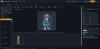

app: https://mega.nz/file/gZElWY6Y#bAKqTsRvn8...oOIl9RakMA
Please report any bugs you find or anything else you think the editor needs. Thank you.
A visual editor for Little Fighter 2 Remastered character .txt files, in a single HTML file. It runs in Chrome or Edge with no install.
Frames: edit a frame’s properties and its body/attack boxes with the sprite shown behind them. Multi-frame editing, copy/paste, mirror, onion skin, and a paintbrush that saves exactly the edited frame back into the PNG sheet.
Map: the animation chains and combos. You can drag to relink frames.
Stage: a background, an opponent dummy and oid objects, with playback driven by the character’s own movement. It estimates damage, defense and knockdown.
Balance, Compare, Validate: a table of damage and reach, a diff of two characters or versions, and a validator with warnings.
TXT: the file exactly as it will be saved, editable.
Safe saving: it round-trips the file exactly and keeps a .bak backup on the first save.
How to use it
Open the page in Chrome or Edge.
In the Characters tab, click Pick game folder and choose Little Fighter 2 remastered (the folder that contains resources). It loads your characters and sprites.
Pick a character, then edit in Frames (drag boxes, arrows move 1 px, Shift moves 5).
Press Save .txt. It writes to the game folder and keeps a .bak copy of the original.
You can also drag a .txt or PNG sheets onto the window. Without Chrome or Edge it opens files read-only, and saving downloads a copy.
app: https://mega.nz/file/gZElWY6Y#bAKqTsRvn8...oOIl9RakMA
Please report any bugs you find or anything else you think the editor needs. Thank you.
![[Image: K7RD9oX.png]](https://i.imgur.com/K7RD9oX.png)