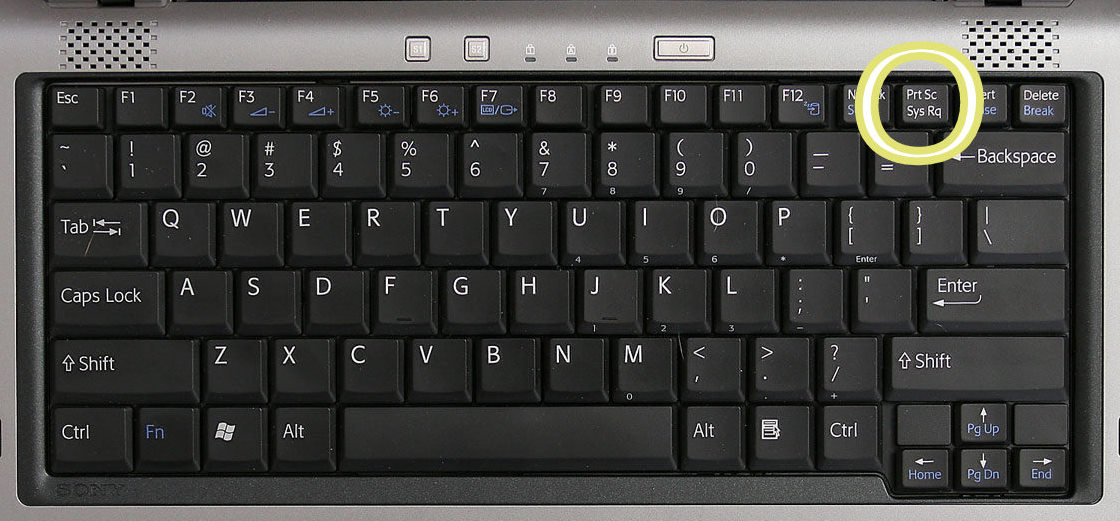
There is a printscreen button located on the top right hand corner of your keyboard.

If you have a laptop you'll have to press & hold down the [Fn] key & then press [PrtSc]
Then Ctrl+Paste it inside of an art program and save it. Upload it to
imgur.com
copy and paste the url and insert [img] tags on both ends of the link and paste it here in your reply
Code:
[img]inserturlname.png[/img]
if you have a huge file for us to access.
Make sure you drag all of your content in a regular .ZIP file, WinRar .ZIP file, or WinRar .RAR
Don't forget to include images, data, audio input and instructions in the .zip file as well.
Upload your .zip file to.....
http://www.mediafire.com/
then Ctrl+paste the url into your reply as well as your screenshots
If you want people to click on a certain text instead of clicking the long url, insert [url] tags
Code:
[url]inserturlname.png[/url]
if your screenshots are just too big for us to view put them in spoilers
Code:
[spoiler=insertname] [/spoiler]
or what you can do is tweek the [img] tags
Code:
[img=50x50]inserturlname.png[/img]

[img=50%]inserturlname.png[/img]

 Chat
Chat Discord





.gif ";)")


![[Image: p45mycA.png]](http://i.imgur.com/p45mycA.png)




![[Image: KA0tGCj.png]](http://i.imgur.com/KA0tGCj.png)